
Waydroid has become a popular solution for running Android apps on Linux systems, especially for users who want mobile apps without switching devices. But one issue keeps frustrating users across the United States and beyond: Waydroid internet not working.
You open an Android app, but nothing loads. Browsers show no connection. Apps fail to sync. Sound familiar?
This guide breaks down why Waydroid internet stops working, how networking actually functions inside Waydroid, and step-by-step solutions that work on modern Linux systems in 2026. Whether you’re a developer, student, or casual user, this article will help you get Waydroid back online—without guesswork.
Understanding How Internet Works in Waydroid
Before jumping into fixes, it helps to understand what’s happening under the hood.
Waydroid runs Android inside a containerized environment using Linux namespaces. It does not directly use your system’s Wi-Fi or Ethernet adapter. Instead, it relies on:
- A virtual network bridge
- Android container IP routing
- Linux firewall and kernel modules
- DNS forwarding from the host system
If any part of this chain breaks, Waydroid internet stops working, even if your Linux system itself is online.
Common Reasons Waydroid Internet Is Not Working
Most internet issues fall into a few repeatable patterns. Identifying the root cause makes fixing it much easier.
Network Bridge Not Created Properly
Waydroid needs a working virtual bridge. If it fails to initialize, Android apps cannot reach the internet.
Firewall or VPN Blocking Traffic
Host firewalls, VPNs, or security tools often block container traffic without warning.
DNS Resolution Failure
Waydroid may have an IP address but still fail to resolve websites due to DNS issues.
Kernel or Module Incompatibility
Older kernels or missing modules can break networking inside the container.
Waydroid Service Not Running Correctly
Sometimes the container starts, but networking services fail silently.
Step-by-Step Fixes for Waydroid Internet Issues
Below are proven solutions that resolve most Waydroid connectivity problems on modern Linux systems.
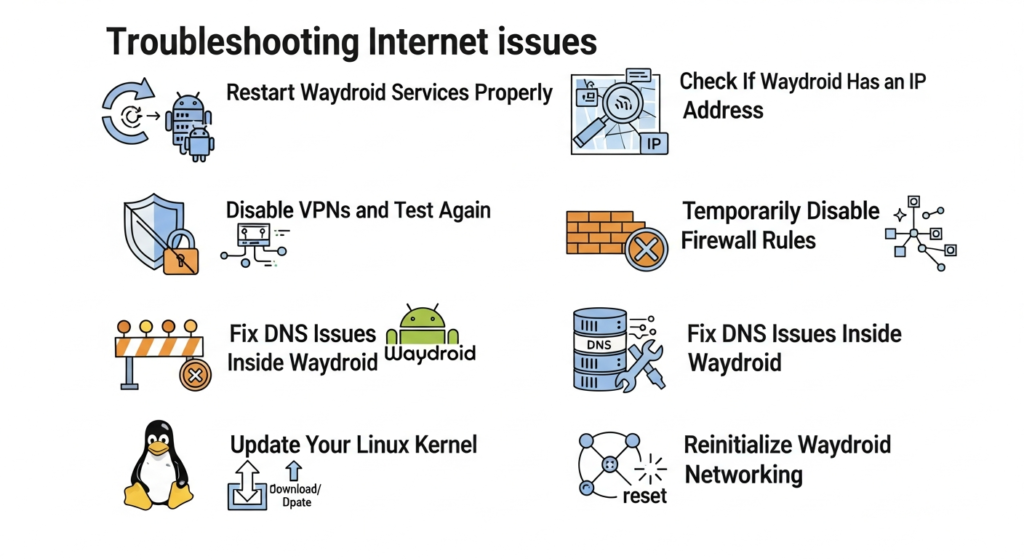
1. Restart Waydroid Services Properly
A simple restart fixes many cases where services failed to initialize.
What to do:
- Stop Waydroid completely
- Restart the Waydroid container
- Relaunch Android apps after the container is fully loaded
This clears temporary routing and DNS glitches that occur after sleep or system updates.
2. Check If Waydroid Has an IP Address
Waydroid must receive an internal IP to access the internet.
What to look for:
- If Android shows “No network” or “Limited connection”
- Apps failing instantly rather than timing out
If no IP is assigned, the network bridge may not be active.
3. Disable VPNs and Test Again
VPNs are a leading cause of Waydroid internet not working.
Many VPNs block containerized traffic by default.
Try this:
- Disconnect your VPN completely
- Restart Waydroid
- Test internet access again
If the issue disappears, configure split tunneling or exclude Waydroid traffic.
4. Temporarily Disable Firewall Rules
Firewalls can silently block Android container traffic.
Recommended test:
- Temporarily disable firewall services
- Restart Waydroid
- Check internet access inside Android
If this works, re-enable the firewall and add proper container rules instead of leaving it off.
5. Fix DNS Issues Inside Waydroid
DNS problems are extremely common and easy to miss.
Signs of DNS failure:
- IP-based apps work, but websites don’t
- Browsers show “DNS_PROBE_FINISHED_NO_INTERNET”
Solution:
- Restart Waydroid after confirming your host system has working DNS
- Avoid custom DNS tools that override system settings
6. Update Your Linux Kernel
Waydroid depends heavily on modern kernel networking features.
Why this matters:
- Older kernels may lack required modules
- Network namespaces may behave incorrectly
Using a newer, stable kernel dramatically improves Waydroid stability in 2026.
7. Reinitialize Waydroid Networking
If nothing else works, resetting Waydroid’s network configuration often solves persistent problems.
This removes broken network states and rebuilds the container connection from scratch.
Advanced Causes of Waydroid Internet Problems
If you’re still having issues, consider these less obvious factors.
System Sleep and Resume Bugs
Waydroid sometimes fails to reconnect after waking from sleep. Restarting the container usually fixes this.
Conflicts With Network Managers
Multiple network management tools can interfere with container routing.
Corporate or Restricted Networks
Some workplace or campus networks block container traffic entirely.
Best Practices to Prevent Future Issues
Once your internet works again, these habits help keep it stable.
- Restart Waydroid after system updates
- Avoid running VPNs unless necessary
- Keep your kernel and system packages up to date
- Use default networking tools instead of experimental ones
Is Waydroid Internet Reliable for Daily Use?
For most users in the United States, Waydroid is reliable when properly configured. Internet issues usually come from host system conflicts, not Waydroid itself.
With the right setup, users successfully run:
- Messaging apps
- Browsers
- Streaming services
- Productivity tools
Frequently Asked Questions (FAQs)
Why is Waydroid connected but has no internet?
This usually means the container has an IP address but DNS or firewall rules are blocking traffic.
Does Waydroid work on Wi-Fi and Ethernet?
Yes. Waydroid works on both, as long as the host network allows container traffic.
Can VPNs break Waydroid internet?
Yes. VPNs are one of the most common reasons Waydroid internet stops working.
Is this a Waydroid bug or a Linux issue?
Most cases are caused by host system configuration, not Waydroid itself.
Do I need to reinstall Waydroid to fix internet problems?
Usually no. Restarting services or fixing network rules is enough.
Does Waydroid work better in 2026 than older versions?
Yes. Networking stability has improved significantly with newer kernels and updates.
Conclusion: Fixing Waydroid Internet Is Easier Than It Looks
If you’re dealing with Waydroid internet not working, the problem is almost always fixable without reinstalling your system. In most cases, the issue comes down to firewalls, VPNs, DNS settings, or container initialization errors.
By understanding how Waydroid handles networking and applying the right fixes, you can restore full internet access and enjoy Android apps seamlessly on Linux.
For users across the United States in 2026, Waydroid remains a powerful and practical solution—as long as the network is set up correctly.
If you’re still facing issues after trying these steps, reviewing your host network configuration carefully is the next best move.